Introduction
In recent years, artificial intelligence agent-based systems have evolved from simple conversational assistants into platforms capable of executing complex workflows and interacting with multiple corporate systems.
With the emergence of the concept of Agentic AI, artificial intelligence systems have gained the ability to reason and perform complex tasks, going beyond simply answering questions.
To carry out these tasks, agents can interact with a variety of external tools, such as:
- Email accounts, to summarize email content, categorize messages, and reply automatically;
- Web browsers, to perform online searches and interact with different systems;
- Office tools, for editing spreadsheets, presentations, text documents, images, videos, and other files;
- Corporate APIs, to integrate multiple systems.
This growing capability creates several challenges: how can we provide secure, standardized, and flexible access to different types of tools, regardless of the programming language, infrastructure, or original protocol?
It was in this context that the Model Context Protocol (MCP) emerged: an open standard that defines how agents and language models can connect to servers that provide tools, resources, and data, enabling uniform and scalable integration.
What is the MCP protocol?
MCP is a protocol that standardizes communication between a client, typically an agent or LLM host, and a server that provides functionality in the form of tools, resources, and predefined prompts.
Initially created by Anthropic for use with Claude, the protocol has received continuous updates and is now being widely adopted to integrate various applications with AI agents.
With MCP, an agent does not need to know the API or the internal implementation of a functionality beforehand. It only needs to connect to the MCP server and discover which operations are available.
The architecture is designed to be extensible and transport-independent, supporting everything from local connections via stdio (standard input and standard output) to remote communication via HTTP streaming, which is essentially the protocol used to load information when you access a web page, such as on LinkedIn, but with persistent bidirectional communication.
Protocol architecture
MCP follows the client-server model, with clear roles:
- MCP Client (host): usually an LLM or environment that consumes the exposed tools, such as OpenAI’s GPT-5 or Google’s Gemini.
- MCP Server: provides a set of functionalities in the form of tools, which can be listed and invoked dynamically by LLMs.
The architecture is divided into two main layers:
- Data Layer: defines high-level operations using JSON-RPC 2.0, such as
tools/list,tools/call,resources/list, and others. - Transport Layer: defines how data is transmitted. It supports protocols such as
stdio, for local connections between an agent and system tools, and streamable HTTP, to allow access to tools hosted on remote servers. This is the most common method when exposing APIs, for example.
Several major companies now provide MCP servers to interact with their platforms. You can find a list of MCP servers available for use at this link.
Differences between MCP and protocols like REST
The main difference between MCP and traditional APIs lies in the role of the agent.
While REST requires a human client or developer to know which endpoint to call and what parameters to pass, MCP allows the AI agent to discover available tools at runtime and decide, based on the conversation context and prompts, which tool to use and what parameters to send.
In MCP, tool discovery is performed dynamically, and integration is achieved by defining structured functions and outputs in LLM responses.
Connections between the agent and tools can be made via stdio, when tools run on the same machine as the agent, or via HTTP through predefined endpoints, which list available tools and process calls according to the context provided by the agent.
Security applied to MCP tools
The protocol was recently updated to specify an OAuth 2.1-based authorization flow for HTTP transports, ensuring that MCP clients only access protected servers after proper authentication and authorization.
It supports automatic discovery of authorization servers, dynamic client registration, use of the resource parameter to bind tokens to the correct server, and strict audience validation, also known as audience binding.
For local connections via stdio, credentials can be obtained from the environment, avoiding the overhead of remote authentication.
When building solutions that use MCP for tool interaction, additional security considerations include:
- Which tools should an agent have access to, and with what permission levels?
- Should an agent have unrestricted access to a solution, executing tools without oversight, or should manual validation, with human-in-the-loop, be required?
- How can you ensure that a tool call will not cause data inconsistency in case of failures or incorrect data?
Companies address these points with strategies such as building applications that follow structured workflows or applying prompt-engineering techniques to achieve more accurate results.
Practical example: creating an MCP tool in C#
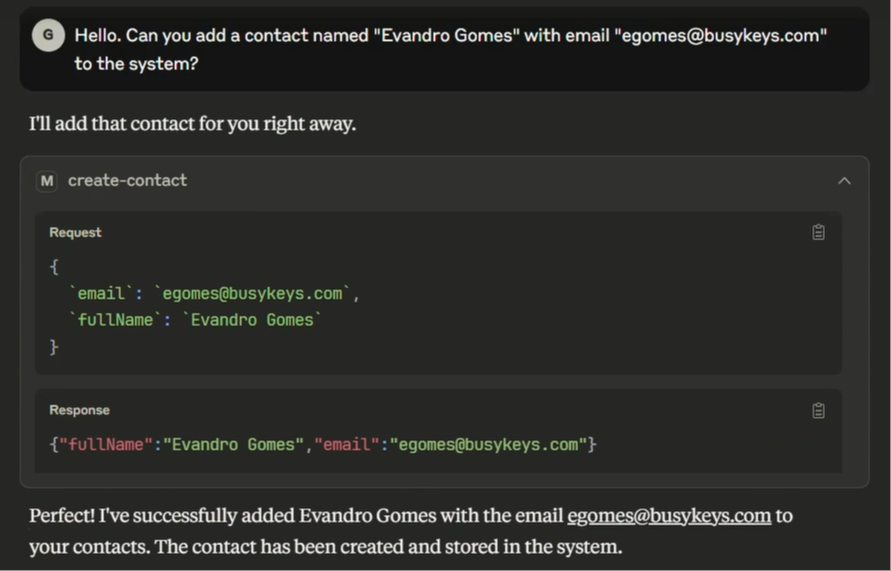
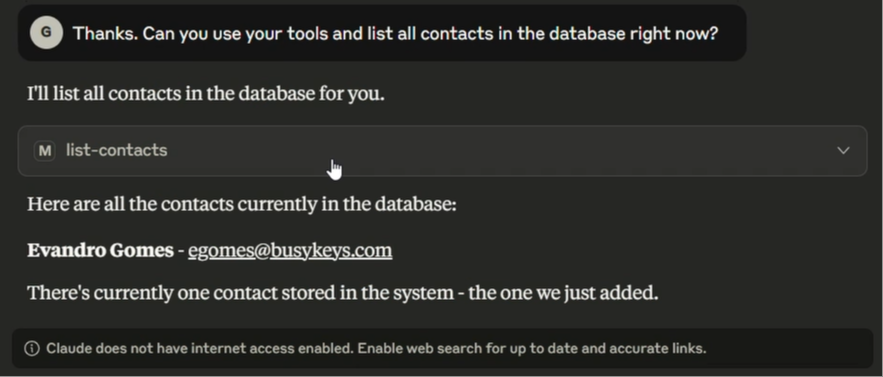
To demonstrate how to create an MCP server and expose tools for use, I built a sample server that provides two tools: one to create contacts and another to list them.
The full source code is available in this repository:
https://github.com/evgomes/mcp-dotnet-manage-contacts
For educational purposes, no database or complex business logic is used. Contacts are stored in memory.
Project structure
The project uses the NuGet packages ModelContextProtocol and ModelContextProtocol.AspNetCore, both at version 0.3.0-preview.3 at the time of writing. These are the official C# SDK packages.
ManageContacts.McpServer/
├─ Tools/
│  └─ ContactTools.cs            # Tools for creating and listing contacts
├─ Properties/
│  └─ launchSettings.json        # Development profile
├─ appsettings.json
├─ ManageContacts.McpServer.csproj
└─ Program.cs                    # ASP.NET Core host + MCP HTTP (/mcp)
Program.cs
This class contains the main configuration to enable MCP services using the HTTP transport. It also registers the tools and maps the MCP routes under /mcp.
var builder = WebApplication.CreateBuilder(args);

// Register the MCP server, enable HTTP transport, and load tools from assembly.
builder
    .Services
    .AddMcpServer()
    .WithHttpTransport()
    .WithToolsFromAssembly();

var app = builder.Build();

// Map the "/mcp" endpoint to serve MCP requests.
app.MapMcp("/mcp");

app.Run();
Tools/ContactTools.cs
This class implements the tools. The McpServerToolType attribute marks the class as a collection of tools, while McpServerTool marks a method as an exposed tool.
The Description attributes are used by LLMs to understand inputs and outputs more accurately when calling tools.
using ModelContextProtocol.Server;
using System.ComponentModel;

namespace ManageContacts.McpServer.Tools;

[McpServerToolType]
public class ContactTools
{
    private static readonly List<Contact> _contacts = new();

    public record Contact(string FullName, string Email);

    [McpServerTool(Name = "create-contact"),
     Description("Creates a new contact with full name and email, stored in memory.")]
    public Contact CreateContact
    (
        [Description("Full name of the contact.")] string fullName,
        [Description("Email address of the contact.")] string email
    )
    {
        // Adds the contact to the in-memory list.
        var contact = new Contact(fullName, email);
        _contacts.Add(contact);
        return contact;
    }

    [McpServerTool(Name = "list-contacts"),
     Description("Lists contacts from in-memory storage. Optionally filters by name or email.")]
    public IEnumerable<Contact> ListContacts
    (
        [Description("Optional case-insensitive filter that searches by name or email.")] string? searchTerm = null
    )
    {
        // Returns all contacts or applies a substring filter.
        var queryable = _contacts.AsQueryable();

        if (!string.IsNullOrWhiteSpace(searchTerm))
        {
            queryable = queryable.Where(x =>
                x.FullName.Contains(searchTerm, StringComparison.OrdinalIgnoreCase) ||
                x.Email.Contains(searchTerm, StringComparison.OrdinalIgnoreCase));
        }

        return queryable.ToList();
    }
}
You can start the project by running the following command in the project folder:
dotnet run --project ManageContacts.McpServer
Make sure you have the .NET 9 SDK installed.
The project listens on:
http://localhost:5096
To test the project, let’s use Claude Desktop. Download and install it from https://claude.ai/download. After that, modify the claude_desktop_config.json configuration file to register the new MCP server:
{
  "mcpServers": {
    "manage-contacts": {
      "command": "npx",
      "args": [
        "-y",
        "mcp-remote",
        "http://localhost:5096/mcp"
      ]
    }
  }
}
This maps the locally running MCP server for Claude’s use. You will need to restart the application for the new tools to appear.
Conclusion
MCP is creating a new paradigm for integrating AI agents with corporate systems. Its dynamic discovery capability, built-in security, and support for multiple transports make it viable for companies of all sizes.
By exposing internal tools as MCP servers, organizations can build agents capable of automating end-to-end tasks, integrating scattered information, and interacting with legacy systems effortlessly.
This standardization not only accelerates innovation but also opens new possibilities for creating intelligent workflows that turn data into action.