


Introduction
In just a few years, software development has gained a long list of AI tools. Claude Code, Cursor, ChatGPT, GitHub Copilot, Codex, Gemini CLI, and others appear or change every month. The 2025 Stack Overflow Developer Survey shows the scale: 84% of respondents use or plan to use AI tools in their development process, up from 76% the year before.
For people who build software, that pace brings a familiar feeling: not knowing where to start. Each tool has its own configuration files, operating modes, and vocabulary, and the recommendations change fast. Behind the confusion lies a deeper shift in scope. The engineer's job moves away from hand-writing source code and toward orchestrating AI agents effectively: deciding what to build, splitting the work, delegating it, and validating the result.
In this article, we revisit how the development lifecycle worked before AI, look at what changed, and discuss how to orchestrate agents with cost and efficiency in mind. Then I introduce the concept of a harness and show where to start with the harness-starter-pack, an open-source template I maintain and use.
The traditional SDLC
The SDLC (software development lifecycle) is the set of stages a piece of software goes through, from idea to operation: requirements gathering and analysis, design, implementation, testing, deployment, and maintenance. Different methodologies arrange these stages in different ways. In the waterfall model, they happen in sequence. In agile methods such as Scrum, which the Scrum Guide defines as a lightweight framework, a Product Owner orders the work into a Product Backlog, the team turns a selection of that work into an increment of value during a sprint (a short, fixed-length cycle), and the team and its stakeholders inspect the result and adjust for the next one.
Before generative AI, a team's routine followed this pattern. Analysts and product owners talked to the business side, gathered requirements, and turned them into user stories with acceptance criteria. The team refined the backlog, estimated items, and planned the sprint. Developers then translated each item into code, by hand: they chose structures, wrote functions, read documentation, debugged, and wrote tests. That manual coding took a lot of time, and estimates and sprint planning reflected that effort.
In this model, mastery of the "how" set professionals apart. Knowing the language, the libraries, the framework idioms, and the details that separate correct code from brittle code made a difference every day. Requirements and design came first, but the center of the routine was writing code.
The abrupt shift
From "how" to "what" and "why"
In some agentic workflows, the distribution of effort can change significantly. The Claude Code documentation describes this shift plainly: instead of writing the code yourself and asking the agent to review it, you describe what you want and the agent works out how to build it. A report from an OpenAI team, which built an internal product with "0 lines of manually-written code," reaches the same conclusion from another direction: the main work became designing environments, specifying intent, and building feedback loops. According to the text, humans prioritize the work, translate user feedback into acceptance criteria, and validate results. The numbers in that report are self-reported, and the team itself says that end-to-end autonomy depends on the structure of the repository and should not be assumed to generalize.
When the "how" is left to the agent, the quality of the result depends on two things: the input and the validation of the output. GitHub, when introducing Spec Kit, explains why: a vague prompt forces the model to guess at potentially thousands of unstated requirements, and some of those guesses will be wrong. Birgitta Böckeler of Thoughtworks, writing on Martin Fowler's site, goes further: correctness of behavior is out of reach for any automated sensor if the person did not specify clearly what they wanted from the start. That is why well-defined specifications and workflows weigh more than syntax details or the quirks of a particular language.
The focus becomes the "what" and the "why." The "how" still exists, but it is no longer the center of the routine.
Orchestrating instead of typing
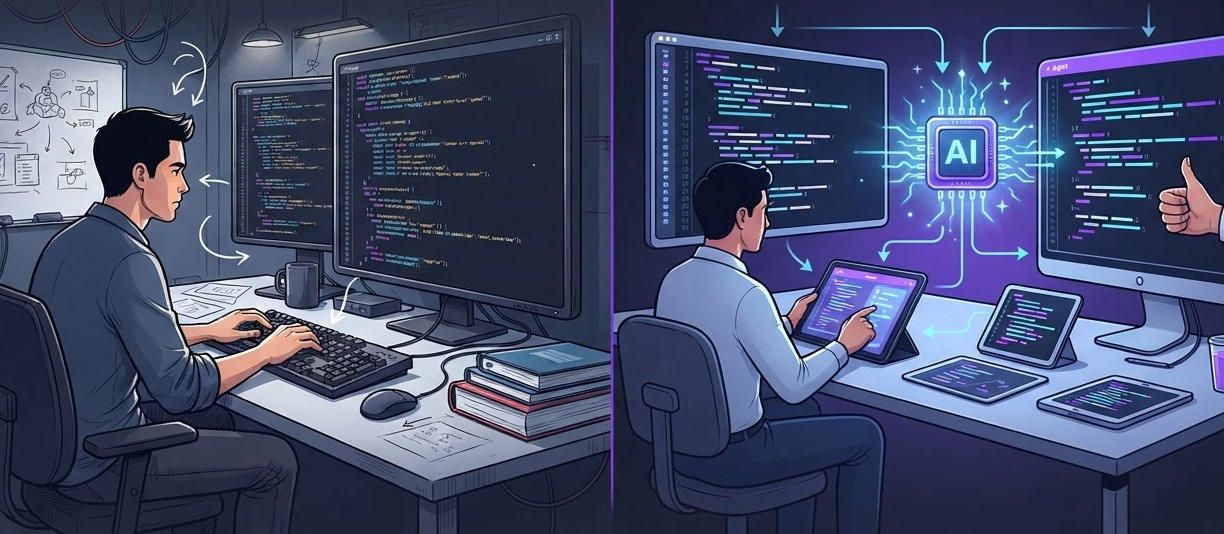
In the new workflow, instead of writing one task at a time, the engineer directs agents that do the work while they handle something else. The Claude Code documentation describes parallel sessions, each in an isolated Git checkout (a worktree), and a writer-and-reviewer pattern in which one session implements and another, with a clean context, reviews. OpenAI reports individual Codex runs that last more than six hours on a single task. METR itself, in its 2026 update, notes that some developers work on another task while the agent runs, which made it hard to measure time spent.
System design matters more
The more code agents produce, the more important the structure around it becomes. OpenAI argues that a layered architecture, with dependency directions enforced by linters (static analyzers) and structural tests, is the kind of decision normally postponed until there are hundreds of engineers, but that becomes an early prerequisite with agents: the constraints are what allow speed without decay. The 2025 DORA report points the same way, with the caveat that the data is self-reported: teams with loosely coupled architectures and fast feedback see gains, while teams held back by tightly coupled systems and slow processes see little or no benefit. Böckeler calls this harnessability: strongly typed languages and clear module boundaries make control easier, and legacy systems are where control is most needed and hardest to build.
Knowing system design, then, is no longer a differentiator reserved for senior engineers. It is the knowledge that lets you define boundaries, weigh trade-offs, and judge whether what the agent delivered fits the system.
What the data shows
Productivity numbers call for care. METR, a nonprofit that evaluates AI, published a randomized controlled trial (RCT) in 2025 with 16 experienced developers working on large open-source repositories. With AI, used mainly through Cursor Pro with Claude 3.5 and 3.7 Sonnet, tasks took 19% longer (confidence interval of +2% to +39%). Participants had expected to be 24% faster and, after the study, still believed they had gained 20%. The sample was small and the time was self-reported.
In February 2026, METR warned that those results were out of date and published a new analysis, with 57 developers and more than 800 tasks. The raw estimates point to 18% less time for the 10 developers from the original study (interval of -38% to +9%) and 4% less for the 47 new ones (interval of -15% to +9%). However, METR considers these estimates a probable lower bound and only very weak evidence about the size of the gain, because some developers avoided participating in tasks without AI.
The 2025 DORA report, based on responses from nearly 5,000 professionals, describes AI as an amplifier of what a team already has. According to the Google Cloud announcement, adoption has a positive relationship with delivery throughput and product performance, but still a negative one with delivery stability. Without strong automated tests, mature version control, and fast feedback, a higher volume of changes is associated with greater instability. The announcement comes from a vendor (Google Cloud), and the data shows correlations, not causation. In the Stack Overflow survey, 46% distrust the accuracy of AI tools and 33% trust it. The top frustration, cited by 66%, is dealing with "AI solutions that are almost right, but not quite." It is a self-reported survey, and it measures perception.
Taken together, these sources support the idea that results depend on the system around the AI and that verification remains essential. None of them measures the gain from a specific harness.
How to orchestrate agents effectively
Tokens, cost, and efficiency
Orchestrating agents effectively starts with understanding that the scarce resource is context, and that it has a cost. The Claude Code documentation says that the context window fills up quickly. As the context window grows, accuracy declines, so it is important to manage it properly. OpenAI makes the same point when explaining why a giant AGENTS.md failed: context is scarce, and a huge file crowds out the task and the relevant code. Cost also weighs on adoption decisions: in the Stack Overflow survey, 25.4% strongly agree and 27.9% somewhat agree that the cost of certain AI agent platforms is a barrier. You can learn more about context-management techniques in the article on context engineering for AI agents.
In practice, this leads to engineering choices that cut waste without cutting quality:
- Short, always-useful instructions. Rules that are always applied are inserted at the beginning of the context in every session, according to the Cursor documentation, so they should contain only what the agent cannot discover on its own.
- Cheap verification first. Tests, linting, and static checks run in seconds and do not spend tokens. Model-based reviews cost more and are saved for chosen moments. Böckeler adds that a well-built harness has a side benefit: fewer wasted tokens.
- Delegation with judgment. Subagents (helper agents with their own context) keep research out of the main conversation, but they carry coordination and verification costs. The template I present below uses parallel subagents only when the person asks for them.
- Restart instead of pushing on. According to the Claude Code documentation, after two failed corrections on the same problem the context is already polluted, and it is better to clear it and start over with a better prompt.
Different tools and models for different jobs
There is no single tool or workflow that meets the needs of every kind of development task. The Claude Code documentation describes a terminal agent with a planning mode, subagents, hooks (scripts that run at defined points in the workflow), and non-interactive execution for CI. Cursor offers rules per project, per user, and per team, with four documented application modes. Copilot reads repository-wide instructions, path-specific instructions, and agent instructions, including AGENTS.md files; when reviewing pull requests, it uses the instructions from the branch with the changes. Each vendor describes its own product, with no independent comparison.
What makes combining them practical is portable instructions. AGENTS.md, an open format maintained by the Agentic AI Foundation under the Linux Foundation, is read by dozens of agents, including Cursor, Codex, the Copilot coding agent, and Gemini CLI. Copilot also accepts CLAUDE.md and GEMINI.md at the repository root.
Model choice follows the same logic. The harness-starter-pack references recommend choosing by difficulty, risk, context, quality bar, latency, and cost, validating the choice on representative work from your own project, and revisiting it when models, harnesses, or prices change. For a bounded task, keep the fastest and cheapest option that consistently meets the required level. Stronger reasoning goes to ambiguous, high-impact, architectural, or adversarial-review work.
Each of these decisions, what the agent reads, what it can run, how it proves what it did, and which model it uses, lives outside the model. That set has a name: harness.
What is a harness?
Definition
One formulation, presented by Vivek Trivedy of LangChain in The Anatomy of an Agent Harness, is Agent = Model + Harness. The harness is all the code, configuration, and execution logic that is not the model itself: system prompts, tools, skills (reusable capabilities), MCP servers (Model Context Protocol, a protocol for connecting tools to models), infrastructure such as the file system and a sandbox (an isolated execution environment), orchestration with subagents and model routing, and hooks. The author says that, in his opinion, this is the cleanest definition.
The Microsoft Agent Framework documentation describes the harness as the runtime scaffolding that turns a language model into an agent that can do work, and applies it to research, coding, data analysis, and other long-running work. The capabilities it lists include context compaction, plan and execute modes, file-based memory, tool approval, and background agents. It is documentation for the company's own product.
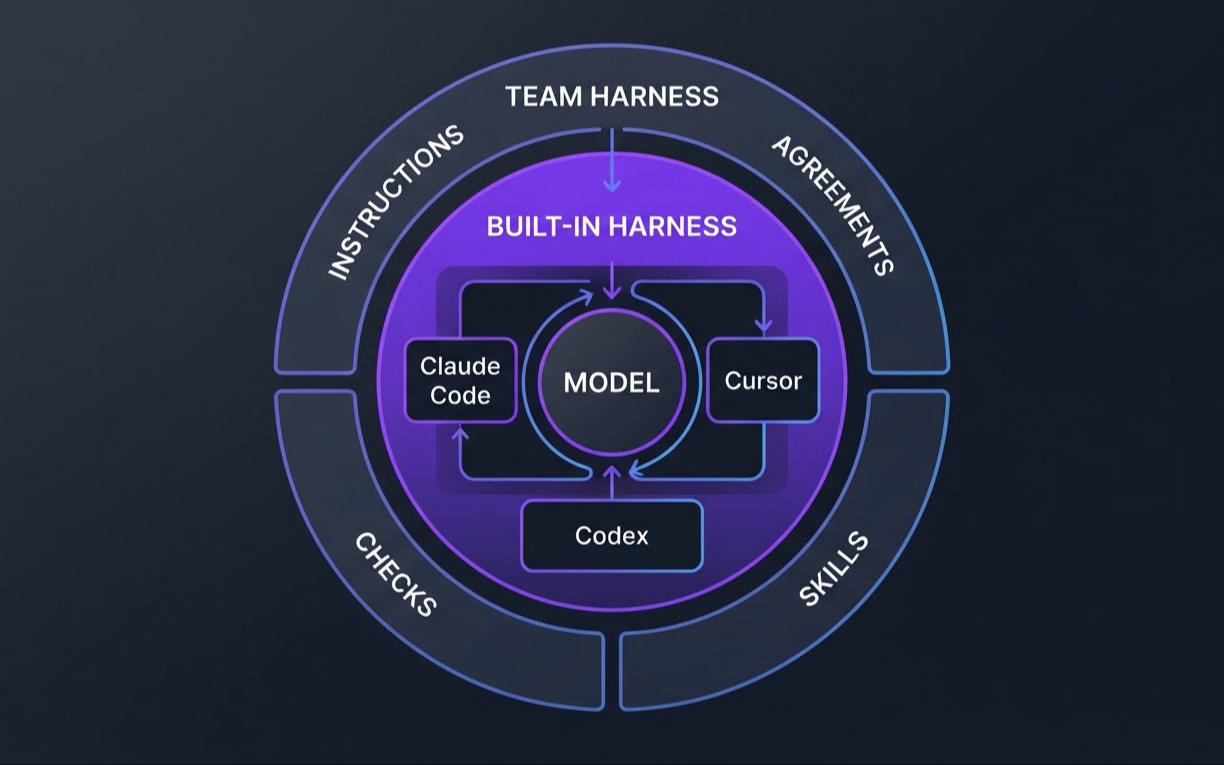
A harness involves one or more models and far more than models: deterministic code, configuration, documentation, and checks. It serves both to orchestrate agents that build software and to solve specific business problems. For development, Böckeler distinguishes the harness built into the tool, which is the vendor's decision, from the outer harness, which the team builds for its own system. That outer harness is the one we control, and it is what the rest of this article covers.
Guides and sensors
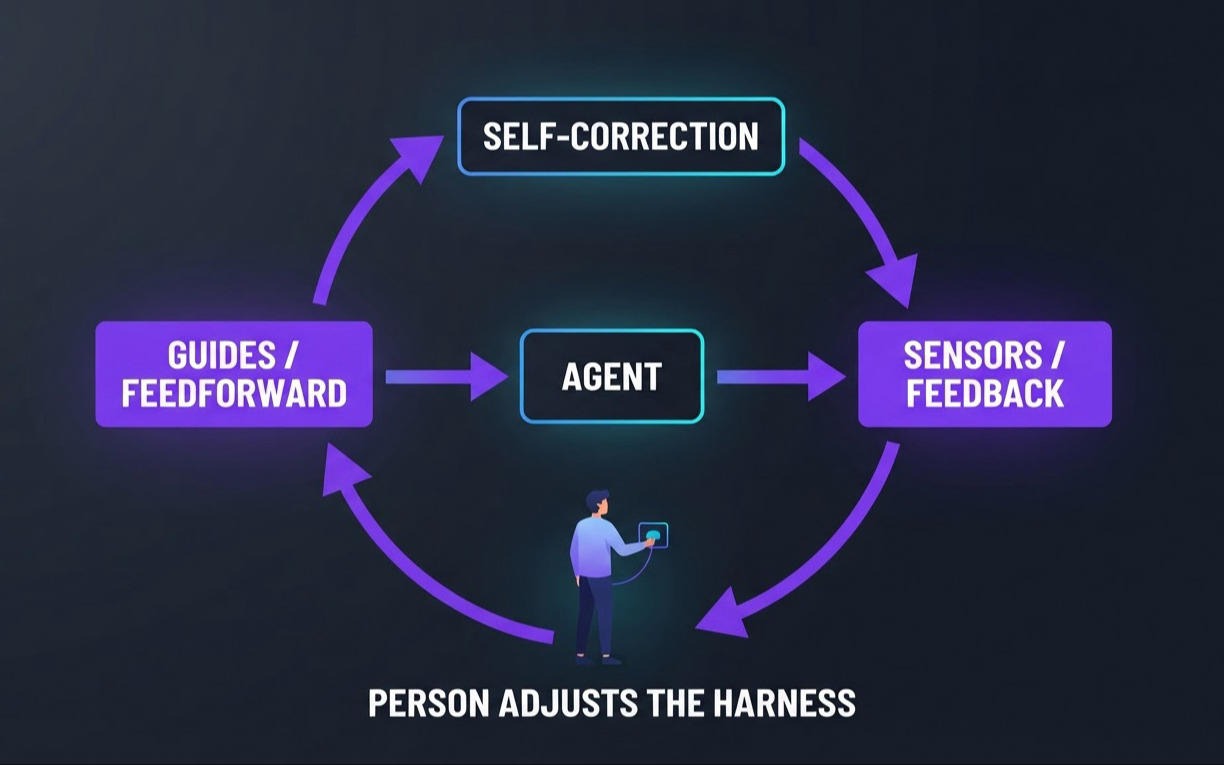
Böckeler organizes the outer harness into two kinds of control. Guides (feedforward controls) act before the agent acts and raise the odds of getting it right on the first try. Sensors (feedback controls) observe after the action and let the agent correct itself. Each can be computational (deterministic and fast, like tests, linters, and type checkers) or inferential (model-based, like an AI review, which is slower, more expensive, and non-deterministic). Feedback alone yields an agent that keeps repeating the same mistakes, and feedforward alone yields an agent that encodes rules without ever finding out whether they work. When a problem recurs, the human's job is to improve the harness. The article is conceptual and contains no quantitative data; it also lists open questions.
How the market implements the harness
Nearly all the sources below are vendor documentation for the vendors' own products. They describe mechanisms, and none of them offers effectiveness data.
| Mechanism | Where it lives | What the documentation describes |
|---|---|---|
| AGENTS.md | Repository root or subfolders | Plain Markdown. In a conflict, the file closest to the edited file wins, and the user's prompt takes precedence. |
| CLAUDE.md, skills, subagents, hooks (Claude Code) | CLAUDE.md, .claude/skills/, .claude/agents/ |
Short persistent instructions, on-demand knowledge, delegation in a separate context, and deterministic scripts. |
| Rules (Cursor) | .cursor/rules/*.mdc, plus AGENTS.md |
Four application modes: always, intelligently, for specific files, and manually. |
| Custom instructions (Copilot) | .github/copilot-instructions.md, .github/instructions/*.instructions.md, AGENTS.md anywhere in the repository, CLAUDE.md or GEMINI.md at the root |
Repository-wide, path-specific, and agent instructions. |
| Spec Kit (GitHub) | /specify, /plan, /tasks commands |
Four phases (specify, plan, break into tasks, implement) with checkpoints. |
One point keeps coming up: too many instructions hurt. OpenAI replaced a large AGENTS.md with one of about 100 lines that works as an index into a versioned docs/ folder, and the Claude Code documentation suggests asking, for each line of CLAUDE.md, whether removing it would make the agent err. There is also a difference between guiding and guaranteeing: CLAUDE.md is advisory, while hooks are deterministic.
Where to start
The harness-starter-pack is the template I built to put these ideas to work on real projects. It is open source under the MIT license, with complete packages in English and Brazilian Portuguese. In this article, I cite the paths of the English package, which lives under en/.
Why I created the repository
The general idea was to gather, in one reusable starting point, the way of working described so far: decide the "what" and the "why" before implementing, prove risky assumptions, execute in verifiable slices, record the state of the work, and review with a fresh context. You copy what you need and adapt it to your project. The repository's principles sum up the proposal: one shared set of engineering agreements, with thin adapters for each tool; skills for optional workflows and concise instructions for durable rules; and evidence before conclusions, especially in code review and security. The ideas come from public sources, collected in en/REFERENCES.md, and the pack does not depend on any specific vendor, framework, or tool. It is a template I use in personal projects, and I decided to share it to give developers a starting point.
My workflow is this: I generate the specification and make all the important decisions before development begins. I then use AI to validate the proofs (steps that depend on confirmation and may change the task's scope if problems or limitations are found) and, in the final stage, more autonomously complete the spec. The gains I have observed are in productivity, code quality, and fewer bugs; all decisions and features also remain documented alongside the project, creating a historical record of changes.
What the repository offers
| Piece | Path | What it is for |
|---|---|---|
| Agent instructions | en/AGENTS.md |
Shared, concise instructions: first steps, a proportionate workflow, engineering standards, delegation, and a completion report. |
| Engineering agreements | en/docs/agreements/ |
Five documents: architecture, dependencies, conventions, workflow, and quality and security. |
| Workflow | en/docs/agreements/workflow.md |
The AI-assisted work sequence. |
| Spec | en/docs/templates/spec.md |
A feature specification with acceptance criteria and slices. |
| Handoff | en/docs/templates/handoff.md |
Passing state between sessions, people, or agents. |
| Verification plan | en/docs/templates/verification-plan.md |
Used when checks span several layers or the change carries meaningful risk. |
| Skills | en/skills/README.md |
A catalog of 11 optional, repeatable workflows. |
| References | en/REFERENCES.md |
Rationale and links to the sources behind the pack. |
AGENTS.md and agreements. AGENTS.md is the entry point: it tells the agent to inspect instructions, Git state, code, tests, and documentation before acting, and to state its understanding, scope, assumptions, and evidence before substantial implementation. Project-specific decisions recorded in the agreements take precedence over generic suggestions. The agreements are starting points, not statements about a project nobody has inspected yet: they must be filled in with decisions and evidence verified in the repository.
Workflow. workflow.md defines the flow: understand the project and the request, specify and approve, run proofs and slices, then verify, review, and deliver. Exploration is optional, and a small, low-risk change can use a lightweight task contract.
Spec. The specification template has several sections: problem and outcome; scope; context and constraints; requirements with acceptance criteria; design and decisions; security, privacy, accessibility, and operations; proofs and implementation slices; risks; verification and release; amendments; acceptance criteria review; and a change log. The developer is responsible for reviewing and accepting the criteria and closing the scope before implementation begins.
Handoff. It records the goal, branch, current slice, decisions, changed paths, verification evidence, risks, and the next action, with a status from "Not started" to "Complete." When a new session or another agent picks up the work, the handoff provides verifiable context to continue.
Built-in skills. The catalog has 11 optional skills covering accessibility, browser visual validation, dependency review, feature and interface exploration, Graphify navigation, hook authoring, security, early code review, and threat modeling. Only the two Graphify skills are preselected, and the rest are covered further below.
Supported stacks today. The pack includes profiles that add architecture, conventions, and verification guidance specific to each technology:
| Profile | Role | Testing and quality starting points |
|---|---|---|
| ASP.NET Core | .NET backend and HTTP APIs | dotnet test, dotnet format, build, and package audit |
| React | Component-based web frontend | Project test runner, TypeScript check when used, ESLint, browser and accessibility checks |
| Java + Spring Boot | Java backend and HTTP APIs | JUnit Jupiter and Spring test support, Checkstyle or a project formatter, integration tests |
| Node.js + Express | Node.js backend and HTTP APIs | node:test or Vitest, Supertest-style HTTP tests, ESLint |
| Python + FastAPI | Python API-first backend | pytest with FastAPI TestClient, Ruff, optional mypy |
| Angular | Angular frontend | Angular CLI ng test, angular-eslint, browser and accessibility checks |
There are also two bundles for repositories that hold both applications: ASP.NET Core + React and Spring Boot + Angular, with integrated guidance on API contracts, browser flows, and end-to-end verification. The catalog notes that the recommendations are candidates, and that the team's decisions and the chosen tool's documentation take precedence. Django REST Framework does not have its own profile yet.
Supported harnesses. The installer can set up Claude Code, Codex, Cursor, and OpenCode. Selected skills are copied into each tool's discovery folder (.agents/skills/ for Codex, Cursor, and OpenCode, and .claude/skills/ for Claude Code), and Codex uses the root AGENTS.md.
Installing in new or existing projects
The installer is an interactive wizard that uses only the Python standard library (3.9 or newer) and runs on Windows, macOS, and Linux. Clone the repository and run it from the root:
git clone https://github.com/evgomes/harness-starter-pack.git
cd harness-starter-pack
py -3 scripts/install.py
On macOS or Linux, use python3 scripts/install.py. The --dry-run flag shows the planned files without writing anything, which helps you review before applying.
The wizard asks whether you want to create a new project folder or add the guidance to an existing repository, and then asks for the path. Next, it shows menus for language (select English), stack profiles, harnesses, and optional skills. For a new folder, it offers to run git init at the end. The installer does not create the application or install dependencies: for that, use the stack's own project generator.
It always copies AGENTS.md, the five agreements, the common templates, the guides, the hook examples, and the portable skill library. Stack profiles and harnesses are optional. The installer also generates a HARNESS-README.md at the project root, with the chosen assets, a setup checklist, and example prompts. In an existing project, files that already exist are skipped by default. Replacing one requires confirmation, and the original goes to .harness-starter-backups/ before the swap. During a normal installation, files are not removed; when migrating from older structures, some files may be moved to new paths while a backup copy is preserved.
After installing, the checklist looks like this:
- Review the preview and confirm the profiles, harnesses, and skills you chose.
- Fill in the agreements for architecture, dependencies, conventions, and quality and security with decisions verified in the code, the manifests, and CI. Keep
workflow.mdas the default unless you have a documented need to adapt it. - Review the stack profiles, choose libraries and versions, and define the real build, test, lint, and security commands.
- Confirm that your chosen harness discovers the instructions and skills, and merge its configuration with what already exists in the project.
- Set up Graphify, if that skill is selected: it requires installing the CLI in your tool environment, and the installer does not do that.
- Start a change with the spec, including acceptance criteria and verification evidence.
- Run the baseline checks and record the real commands and results.
If you prefer the manual route, read en/AGENTS.md and the agreements index and copy only what the project needs.
Spec files to guide development
A few practices make a difference when writing specs:
- Observable criteria. Each criterion gets an ID and acceptance evidence, which can be a test, an inspection, or a manual check.
- Facts, assumptions, and decisions kept apart.
workflow.mdasks the spec to keep facts, suggestions, and decisions distinct, and to make assumptions that need proof explicit. - Out of scope stated. The template has a dedicated section for it, which helps contain scope creep.
- Approval before implementation. The responsible engineer reviews and adjusts the criteria before accepting the spec.
- Amendments instead of silent changes. Any deviation from the accepted plan becomes an amendment, with the decision recorded.
| ID | Requirement / scenario | Acceptance evidence |
|---|---|---|
| AC-01 | Given … when … then … | `<test, inspection, or manual check>` |
Two techniques from the Claude Code documentation help. The first is to ask the agent to interview you about implementation, edge cases, and trade-offs before writing SPEC.md. The second is to run the spec in a fresh session, with a clean context. According to the guide, the most useful specs are self-contained: they name the files and interfaces involved, state what is out of scope, and end with an end-to-end verification step. Spec Kit proposes a similar path, in four phases. For small changes, the opposite applies: the Claude Code guide suggests skipping the plan when the diff can be described in one sentence.
Checklists, phases, orchestrator, and models
Implementation follows sequential slices. If an assumption could invalidate the plan, Slice 1 is a proof of that assumption, with the method and result recorded. The next slice starts only when the current one is complete and has evidence. The pack's references remind us that a checklist records progress but does not prove results, which is why every item carries evidence. Focused checks run per slice, and the full suite runs once, after all slices. The handoff follows each step, and its resume checklist carries a warning: the summary is not proof, and key claims should be verified against the code.
For orchestration, workflow.md establishes that the primary agent keeps scope, architecture and security decisions, shared contracts, integration, verification, and the final report. Parallel subagents come in when the person asks for them, and the workflow warns against delegating just because tasks look independent. When work is delegated, the task is bounded with files, expected output, evidence, and a handoff, and the integrated work is verified. Stronger models take orchestration and ambiguous or high-impact decisions, and cheaper models handle bounded, verifiable tasks. Worktrees isolate the work when requested.
Shift-left code review
Shift left means moving verification toward the start of the cycle, where fixing things is cheaper. Böckeler describes this distribution: what is fast, such as linters, quick tests, and a basic review agent, runs before integration. What is expensive, such as mutation testing and a broader review, runs in the pipeline.
In the template, code review happens inside the development phase. The shift-left-code-review skill runs one adversarial round at the end of a complete spec-driven implementation, against the requirements and the final diff. The workflow calls for a single round rather than repeating the review on every slice. workflow.md asks for a strong model when available, and for each finding to be resolved or documented as an accepted exception, with an owner, controls, and a review date.
The Claude Code documentation adds two cautions. The reviewer should have a fresh context, so it judges the result without the bias of whoever produced it. And it should be told to report only gaps that affect correctness or the stated requirements, because a reviewer pressed to find problems tends to push toward over-engineering. In any case, AI review complements human review and CI; it does not replace them.
Other useful skills
In day-to-day work, we do not always have a concrete idea of everything we need before writing a spec. Security and accessibility also need to be validated to ensure the quality of the solution. The repository includes skills that can help with these needs:
Feature and interface exploration. These come before the spec, when the problem or the visual direction is unclear. For interface exploration, the workflow asks for at least three ideas, prototyped with the real stack and mocked data.
Threat modeling and security review. These apply to changes that affect identity, sensitive data, trust boundaries, integrations, uploads, privileged operations, or abuse, with support from guidance such as OWASP's. For common risks in applications built with AI, see Your AI-Generated Application Works. But Is It Secure? and Beyond Login: Other Security Risks in Applications Built with AI.
Dependency review. It checks purpose, maintenance, licensing, transitive risk, and security before a package is added, and updates the dependencies agreement.
Accessibility review and browser visual validation. These inspect the rendered interface against applicable WCAG criteria and record the environment used.
Hook authoring. It designs hooks with explicit limits for anything that cannot depend on instructions alone.
Skills guide the agent, but they are not a substitute for CI, human review, or deterministic checks, as the catalog itself states. AGENTS.md says not to load every skill by default: start with the preselected ones and expand as the need shows up.
Conclusion
The development lifecycle has changed. Before, developers spent time on manual coding, and the differentiator was mastery of the "how" (specific knowledge of technologies and tools). With AI agents, the quality of the result depends on a well-defined input, with clear specifications and workflows, on rigorous validation of the output, and on system design knowledge to support the decisions. Orchestrating agents effectively also requires attention to cost, context, and the choice of tools and models.
If your team wants to adopt AI agents in development, build a harness for your projects, or review your current workflow before scaling up, we can help evaluate the process, the checks, and the risks. If you still have questions about where to start or how to improve productivity and reduce costs, get in touch with us to talk about it.
Sources
AGENTS.MD. AGENTS.md. Available at: https://agents.md/. Accessed Oct. 22, 2026.
ANTHROPIC. Best practices for Claude Code. Claude Code Docs. Available at: https://code.claude.com/docs/en/best-practices. Accessed Oct. 22, 2026.
BECKER, Joel; RUSH, Nate; BARNES, Beth; REIN, David. Measuring the Impact of Early-2025 AI on Experienced Open-Source Developer Productivity. METR, Jul. 10, 2025. Available at: https://metr.org/blog/2025-07-10-early-2025-ai-experienced-os-dev-study/. Accessed Oct. 22, 2026.
BECKER, Joel; RUSH, Nate; CUNNINGHAM, Tom; REIN, David; MAHAMUD, Khalid. We are Changing our Developer Productivity Experiment Design. METR, Feb. 2026. Available at: https://metr.org/blog/2026-02-24-uplift-update/. Accessed Oct. 22, 2026.
BÖCKELER, Birgitta. Harness engineering for coding agent users. martinfowler.com, Apr. 2, 2026. Available at: https://martinfowler.com/articles/harness-engineering.html. Accessed Oct. 22, 2026.
CURSOR. Rules. Cursor Docs. Available at: https://cursor.com/docs/rules. Accessed Oct. 22, 2026.
DELIMARSKY, Den. Spec-driven development with AI: Get started with a new open source toolkit. GitHub Blog, Sep. 2, 2025. Available at: https://github.blog/ai-and-ml/generative-ai/spec-driven-development-with-ai-get-started-with-a-new-open-source-toolkit/. Accessed Oct. 22, 2026.
DORA. DORA Research: 2025 – State of AI-assisted Software Development. Available at: https://dora.dev/research/2025/dora-report/. Accessed Oct. 22, 2026.
GITHUB. Adding repository custom instructions for GitHub Copilot. GitHub Docs. Available at: https://docs.github.com/copilot/customizing-copilot/adding-repository-custom-instructions-for-github-copilot. Accessed Oct. 22, 2026.
GOMES, Evandro. harness-starter-pack. GitHub. Available at: https://github.com/evgomes/harness-starter-pack. Accessed Oct. 24, 2026.
HARVEY, Nathen; DEBELLIS, Derek. Announcing the 2025 DORA Report: State of AI-Assisted Software Development. Google Cloud Blog, Sep. 23, 2025. Available at: https://cloud.google.com/blog/products/ai-machine-learning/announcing-the-2025-dora-report. Accessed Oct. 22, 2026.
LOPOPOLO, Ryan. Harness engineering: leveraging Codex in an agent-first world. OpenAI, Feb. 11, 2026. Available at: https://openai.com/index/harness-engineering/. Accessed Oct. 22, 2026.
MICROSOFT. Agent Harness (Microsoft Agent Framework). Microsoft Learn, updated Sep. 21, 2026. Available at: https://learn.microsoft.com/en-us/agent-framework/concepts/harness. Accessed Oct. 22, 2026.
SCHWABER, Ken; SUTHERLAND, Jeff. The 2020 Scrum Guide. Scrum Guides, Nov. 2020. Available at: https://scrumguides.org/scrum-guide.html. Accessed Oct. 23, 2026.
STACK OVERFLOW. 2025 Stack Overflow Developer Survey: AI. Available at: https://survey.stackoverflow.co/2025/ai. Accessed Oct. 22, 2026.
TRIVEDY, Vivek. The Anatomy of an Agent Harness. LangChain Blog, Mar. 10, 2026. Available at: https://www.langchain.com/blog/the-anatomy-of-an-agent-harness. Accessed Oct. 22, 2026.