Introduction
Artificial intelligence is often associated with chatbots, text generation, document automation, and virtual assistants. These are important use cases, but they represent only part of what the technology can do inside companies.
In many industries, especially manufacturing, logistics, retail, and construction, a significant part of the operation happens in the physical world. The most important data is not always in a spreadsheet, a CRM, or a message history. In many cases, it is in a camera pointed at a production line, a warehouse area, a store, a machine, or a construction site.
This is where computer vision becomes especially useful. It allows artificial intelligence systems to analyze images and videos to identify objects, people, situations, and visual patterns. Instead of working only with text, AI can also interpret scenes.
In this article, we will look at what computer vision is, what YOLO26 is, why this type of model can be useful in business applications, and how a practical example can be built for a very concrete scenario: detecting whether construction workers are wearing personal protective equipment, also known as PPE.
To make the explanation more practical, this article uses the following GitHub repository as a reference. It contains a working example with training, evaluation, and video testing using Ultralytics’ Construction-PPE dataset: yolo26-construction-ppe-image-recognition.
What is computer vision?
Computer vision is an area of artificial intelligence focused on interpreting images and videos. Its goal is to allow a system to extract useful information from visual content.
In practice, this can mean several things:
- identifying objects in an image;
- locating where those objects appear;
- classifying images into categories;
- segmenting specific areas;
- recognizing visual patterns;
- tracking objects or people in video;
- detecting behaviors, conditions, or relevant situations.
A language model learns relationships between words, sentences, and textual contexts. A vision model learns relationships between pixels, shapes, colors, textures, positions, and visual patterns. It does not see the way a person sees, but it learns, from many examples, that certain visual combinations tend to represent specific objects or situations.
Imagine a safety inspector walking through a construction site. The inspector observes workers, equipment, circulation areas, and potential risk situations. When looking at a person, the inspector notices signals: helmet, vest, boots, gloves, goggles, posture, location, proximity to machines, and the context of the activity.
A computer vision system tries to turn part of that perception into an automated process. The camera provides the image. The model analyzes the scene. The application interprets the results and can generate alerts, records, or indicators.
This type of solution does not replace human responsibility, especially in safety-related environments. However, it can act as an additional layer of observation, helping teams monitor repetitive situations, identify patterns, and respond faster when something requires attention.
What is object detection?
Within computer vision, one of the most common tasks is object detection.
Object detection combines two questions:
- What appears in the image?
- Where does it appear?
When a model detects a helmet, for example, it usually returns a class, such as helmet, and a bounding box indicating the area of the image where that object was found.
This distinction matters. Classifying an entire image as a “construction site” can be useful in some contexts, but it does not solve the problem of knowing whether a specific worker is not wearing a helmet. For this type of application, the system needs to locate elements inside the scene.
In a construction image, a detection model can find several classes at the same time: people, helmets, vests, gloves, boots, goggles, and signs of missing equipment. Each detection includes a position and a confidence score.
This is what makes it possible to build applications closer to daily operations. Instead of only saying that there are workers in the image, the solution can indicate that a person was detected, that a helmet was identified in a specific region, and that a class associated with missing gloves appeared in another part of the scene.
What is YOLO?
YOLO stands for You Only Look Once. The name became well known as a family of object detection models designed for fast analysis, with strong adoption in applications that work with images and videos.
The general idea is to process an image efficiently in order to identify objects and their positions. Over the years, the YOLO family has become one of the practical references for object detection, especially when an application needs to balance quality, speed, and ease of use.
This balance is important in real projects. In a business environment, it is not enough for the model to work well on a single image. In many cases, the solution needs to analyze video, run on computers with limited resources, respond within a reasonable time, and be simple enough to fit into an existing workflow.
That is why YOLO often appears in examples involving:
- safety monitoring;
- object counting;
- visual inspection;
- traffic analysis;
- access control;
- tracking people or vehicles;
- detecting equipment and items in operational environments.
In this article, the focus is using YOLO to detect protective equipment and possible PPE violations in construction scenes.
What is YOLO26?
YOLO26 is a family of Ultralytics models for real-time computer vision tasks. According to the official documentation, it was designed as a unified foundation for different visual tasks, including object detection, segmentation, classification, pose estimation, and oriented detection.
Ultralytics presents YOLO26 as an evolution of the YOLO family with special attention to efficiency and usability across different types of equipment. In practical terms, this means trying to maintain good detection quality without making processing too heavy.
Some technical points appear frequently in the model documentation and scientific paper. Two of them are worth briefly explaining:
- NMS, short for Non-Maximum Suppression, is a step used in many detection models to remove duplicate boxes when the system finds multiple possible positions for the same object. In simple terms, it is like choosing the best marking when the model draws several very similar boxes over the same helmet or person.
- DFL, short for Distribution Focal Loss, is a technique used during the training of some models to help adjust the boxes that locate objects. This is a more internal detail of the model, but the general idea is to improve how the system learns to position markings in the image.
YOLO26 proposes changes in parts like these. It aims to simplify detection steps and reduce additional processing, which can be useful when the goal is to analyze images faster or run the model on less powerful equipment.
In the technical paper published on arXiv about YOLO26, the authors describe the family as a line of unified models for real-time vision, with five main scales and support for multiple vision tasks. Ultralytics’ documentation also highlights results on COCO, a widely used dataset for comparing computer vision models, and speed measurements on specific hardware.
These numbers should not be interpreted as a guarantee of performance in every environment. Real results depend on factors such as camera quality, lighting, image size, object distance, the computer being used, and the project configuration. Even so, they help explain why the model is an interesting option for practical computer vision examples.
Why does this type of solution make sense for businesses?
When people talk about artificial intelligence applied to companies, the first association is often customer service, content generation, document analysis, or administrative task automation.
These areas are relevant, but they leave out a large set of physical operations. In many businesses, an important part of productivity, quality, and risk exists in environments that can be observed by cameras.
Some examples:
- in manufacturing, computer vision can support quality inspection;
- in logistics, it can help count boxes, pallets, or vehicles;
- in retail, it can support shelf analysis, people flow monitoring, and loss prevention;
- in agriculture, it can help identify plant diseases or crop failures;
- in physical security, it can detect unauthorized access or presence in restricted areas;
- in construction, it can support PPE monitoring and visible safety conditions.
Construction is a good example because the problem is easy to understand. The proper use of helmets, gloves, vests, boots, and safety goggles can be directly related to worker safety and operational compliance.
A camera positioned in a circulation area or a critical point of a construction site can continuously generate images. A computer vision model can process those images and identify events that deserve attention. The application can record occurrences, generate indicators, highlight video segments, or send notifications to the people responsible.
This type of application helps turn visual observation into useful operational information. The company gains more data to monitor processes, identify recurring situations, and support decisions related to safety, quality, or productivity.
What problem are we going to demonstrate?
The example in this article uses the Construction-PPE dataset, maintained by Ultralytics.
A dataset is a set of data used to train or evaluate an artificial intelligence model. In this case, the dataset contains construction images with annotations indicating people, protective equipment, and situations where equipment is missing.
This dataset was created for PPE detection in construction images. It includes classes for equipment that is present and also classes associated with missing equipment. This matters because it brings the training process closer to the type of question a company would ask in practice.
The goal is to identify possible situations such as:
- a worker without a helmet;
- a worker without gloves;
- a worker without boots;
- a worker without safety goggles.
In the example repository, the construction-ppe.yaml file defines the classes used in training. A YAML file is a text-based configuration file. It tells the program where the data is located and which class names the model should learn.
path: construction-ppe
train: images/train
val: images/val
test: images/test

names:
  0: helmet
  1: gloves
  2: vest
  3: boots
  4: goggles
  5: none
  6: Person
  7: no_helmet
  8: no_goggle
  9: no_gloves
  10: no_boots

download: https://github.com/ultralytics/assets/releases/download/v0.0.0/construction-ppe.zip
In this file, the dataset separates equipment that is present, such as helmet, gloves, vest, boots, and goggles, from violation classes, such as no_helmet, no_goggle, no_gloves, and no_boots.
This structure is useful because it allows the application to have a more direct view of operational risk. The model learns both to recognize protective equipment and to identify some situations where that equipment appears to be missing.
What is included in the example repository?
The yolo26-construction-ppe-image-recognition repository organizes a full flow to train, evaluate, and test the model.
Since the example code is more technical, it is worth explaining some of the terms used in this part of the article before moving on:
- Python is the programming language used in the example. It is very common in artificial intelligence projects because of the large number of available libraries.
- A library is a package of ready-made code that makes a task easier. In this case, the Ultralytics library simplifies the use of YOLO models.
- A script is a file with code instructions that can be executed to perform a task, such as downloading data, training the model, or processing a video.
- A notebook is an interactive format widely used in data science and artificial intelligence. It allows text, code, and results to be combined in the same file.
The structure is separated into steps to make it easier to understand:
requirements.txt: list of the project’s main dependencies;construction-ppe.yaml: dataset configuration;download_dataset.py: optional script to download and extract the dataset before training;train.py: YOLO26 training script;evaluate.py: evaluation script that generates metrics;detect.py: script to analyze images, videos, folders, or webcam input;download_video.py: helper script to download an example video;notebooks/yolo26-construction-ppe.ipynb: notebook with the step-by-step walkthrough;runs/train/ppe_yolo26n/weights/best.pt: file with already trained weights to make testing easier.
This organization helps in two different scenarios.
In the first one, you can download the dataset, train the model, evaluate the metrics, and then test it on video. This path is better for understanding the full process.
In the second one, you can use the best.pt file already included in the repository and run the video test directly. This path is useful when the goal is to see the example working before training the model from scratch.
How to prepare the environment
The project was designed to run with Python and the Ultralytics library. To avoid conflicts with other projects installed on the computer, the ideal approach is to create a virtual environment.
A virtual environment is an isolated folder with the libraries used only by that project. This helps keep dependencies organized.
Windows
On Windows, the basic flow is to create the virtual environment, activate it, and install the dependencies:
py -3 -m venv .venv
.venv\Scripts\Activate.ps1
python -m pip install --upgrade pip
pip install -r requirements.txt
If PowerShell blocks the virtual environment activation, you can allow script execution only for the current process:
Set-ExecutionPolicy -Scope Process -ExecutionPolicy Bypass
After that, run the activation command again:
.venv\Scripts\Activate.ps1
macOS and Linux
On macOS and Linux, the process is similar. The main difference is the command used to activate the virtual environment:
python3 -m venv .venv
source .venv/bin/activate
python -m pip install --upgrade pip
pip install -r requirements.txt
On some Linux installations, you may need to install Python’s virtual environment package first:
sudo apt install python3-venv
On macOS, if Python is not installed, common options include installing it from the official Python website or using tools such as Homebrew.
The project’s main dependencies include Ultralytics, OpenCV, Pillow, NumPy, PyYAML, Pandas, Matplotlib, Jupyter, and yt-dlp.
ultralytics>=8.4.60
opencv-python>=4.9.0
pillow>=10.0.0
numpy>=1.26.0
pyyaml>=6.0
tqdm>=4.66.0
matplotlib>=3.8.0
pandas>=2.0.0
jupyter>=1.1.1
yt-dlp>=2025.5.22
The project can run on CPU, which means using the computer’s regular processor. For longer training runs, a GPU, which is a type of processor commonly used for graphics and artificial intelligence workloads, usually makes the experience much faster.
How to download the dataset
The dataset can be downloaded automatically by Ultralytics during training because the construction-ppe.yaml file includes the download URL.
Even so, the repository also includes the download_dataset.py script, which lets you download and extract the dataset explicitly:
python download_dataset.py
If your system uses python3 instead of python, use:
python3 download_dataset.py
The expected directory is:
construction-ppe
In a real example, this step is also a good opportunity to look at some images and understand whether they resemble the environment you want to analyze. A model trained on images from one condition may behave differently when applied to another camera, another type of construction site, different lighting, or a different uniform pattern.
How to train the model
Training is done through the train.py script.
The idea is to load a base file, such as yolo26n.pt, and adapt the model to the Construction-PPE dataset.
The yolo26n.pt file is a pre-trained YOLO26 model. The .pt extension is used by PyTorch files, and PyTorch is a widely used artificial intelligence library. The letter n indicates the nano version, which is a smaller and lighter version of the model. It is usually a good choice for initial examples because it requires fewer computer resources.
Instead of starting from zero, training begins with this base model and adapts what it has already learned to the PPE dataset classes. This process is common in computer vision: a model that has already learned general visual patterns is adjusted for a specific problem.
In the example repository, the model was trained for 100 epochs, or repetitions, and the computer used had a GPU, related to the graphics card, which speeds up the training process. If you do not have a computer with a dedicated GPU for training, it is possible to use the CPU, but the process may take much longer.
A more complete training run can be executed like this:
python train.py --model yolo26n.pt --epochs 100 --imgsz 640 --batch 16 --device 0 --workers 4
If your system uses python3, replace python with python3.
In this command:
--model yolo26n.ptdefines the base model;--epochs 100defines how many times training goes through the image set;--imgsz 640defines the image size used during training;--batch 16defines how many images are processed in each batch;--device 0uses the first available GPU;--workers 4defines how many helper processes are used to load the data.
To quickly check whether the environment is working, the README suggests a small CPU test:
python train.py --epochs 1 --fraction 0.05 --batch 2 --device cpu --workers 0 --name smoke_test
This short test helps confirm whether the dependencies were installed, whether the dataset is accessible, whether the base model is downloaded correctly, and whether the result files are generated.
At the end of training, the results are stored in a folder inside:
runs/train/<test-name>/
The most important weight file will usually be:
runs/train/ppe_yolo26n/weights/best.pt
This file represents the best version saved during training and will be used in the next steps.
How to evaluate the model
After training, the next step is to evaluate the model using separate test images. This is done through the evaluate.py script.
An evaluation example is:
python evaluate.py --weights runs/train/ppe_yolo26n/weights/best.pt --split test --device 0
On CPU:
python evaluate.py --weights runs/train/ppe_yolo26n/weights/best.pt --split test --device cpu
This step is important because watching the annotated video is not enough to understand whether the model is performing well. You need to look at metrics.
In object detection, common metrics include precision, recall, and mAP.
In simple terms:
- precision helps measure how many of the model’s markings were correct;
- recall helps measure how many relevant objects the model was able to find;
- mAP is a widely used metric for evaluating object detection, considering both classes and box positions.
The script saves a file called evaluation_summary.json.
A JSON file is a text format commonly used to store structured data. It is similar to an organized record with name-and-value pairs. In this case, the file stores a summary of the evaluation metrics.
Among the saved fields are:
map50_95;map50;map75;mean_precision;mean_recall;per_class_map50_95;- totals for
tp,fp, andfn.
These results are stored in:
runs/val/<test-name>/
This evaluation helps answer more useful questions than simply “does the video look interesting?”. For example:
- which classes does the model recognize better?
- does it make more mistakes when equipment is present or when it is missing?
- does it mark many violations that are not actually there?
- does it miss many real violations?
- does the quality seem good enough to generate alerts, or only for later analysis?
These questions help determine whether the example is working well and what precautions would be needed in a real scenario.
How to test it on video
The most visual part of the example, and in my view the most interesting one, is video analysis through the detect.py script.
The repository supports testing with images, videos, folders, or webcam input. For this article’s example, the simplest path is to place a video at:
videos/construction-workers.mp4
The README also includes a helper script that tries to download an example video:
python download_video.py
After that, video analysis can be executed with GPU:
python detect.py --weights runs/train/ppe_yolo26n/weights/best.pt --source videos/construction-workers.mp4 --device 0
Or on CPU:
python detect.py --weights runs/train/ppe_yolo26n/weights/best.pt --source videos/construction-workers.mp4 --device cpu
The expected result is an annotated video saved at:
runs/inference/construction-workers_detected.mp4
If the model detects the safety equipment, the generated video will be the original video with boxes marking each type of detected object.
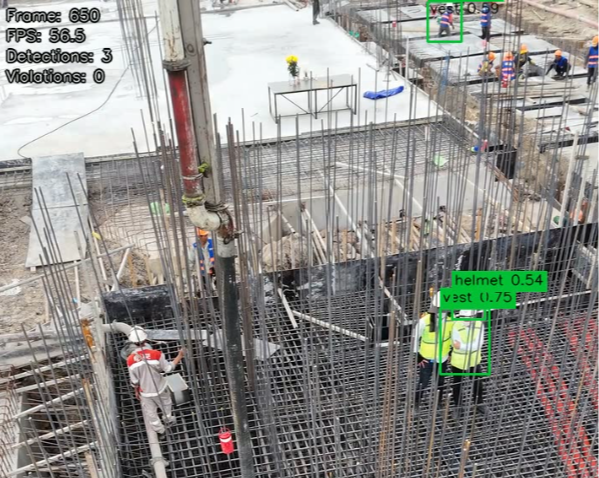
The most interesting point in detect.py is that it organizes the output in a way that is closer to an operational reading.
At the beginning of the file, the script defines which classes will be treated as violations:
VIOLATION_CLASSES = {"no_helmet", "no_goggle", "no_gloves", "no_boots"}
With this, boxes associated with violations are highlighted in red. The Person class receives a neutral color, and the other items receive a positive color. The script also draws an information panel over the video with data such as the current frame, FPS, total detections, and total violations.
In addition to the annotated video, the process saves a file:
runs/inference/inference_summary.json
This summary includes information such as the source, output file, number of processed frames, total detections, total violations, and processing time.
In practice, this makes it possible to move beyond a purely visual analysis and start recording information that could feed reports, indicators, or notifications.
How could this example be useful in a company?
The example presented here shows a simple path: take images or videos, detect people and equipment, identify possible violations, and generate a visual result with summarized information.
In a company, the same idea could be adapted to different needs. In construction, for example, the solution could help safety teams monitor critical areas of the site and identify recurring patterns of non-compliance.
This does not mean making automatic decisions against workers. In safety applications, computer vision usually makes more sense as support for observation and human review. The system can point out situations that deserve attention, while the responsible team interprets the context and decides what to do.
It is also important to remember that safety rules vary by area, activity, and context. In one part of the site, a specific PPE item may be mandatory. In another, the requirement may be different. That is why the visual model should be combined with clear business rules.
Beyond construction, the same logic can be applied in other sectors:
- detecting the absence of a required uniform or equipment;
- monitoring movement in restricted areas;
- identifying objects out of place;
- monitoring equipment usage on production lines;
- counting items on shelves, conveyor belts, or inventory areas;
- analyzing visual inspection images.
The key point is that cameras can generate useful data for operations. When this data is analyzed consistently, the company gains an additional layer of monitoring.
Where do AI agents fit into this architecture?
The example in this article ends with an annotated video and a file summarizing the results. But the same type of output could feed other systems.
Imagine that the system identifies repeated occurrences of no_helmet through a video camera. Instead of only saving the video, the application could record an event with time, camera, violation type, and visual evidence.
From there, an AI agent or automated workflow could take the next step:
- summarize what happened in natural language;
- send a notification to a supervisor;
- create a ticket in an internal system;
- consolidate indicators by shift, construction site, or team;
- generate a daily compliance report;
- highlight images or video clips for human review.
In this design, the computer vision model identifies what appears in the image. The AI agent helps organize the information, communicate with the right people, and connect the event to a business process.
This combination is interesting because it brings visual artificial intelligence closer to daily operations. The camera stops being only a recording source and starts contributing signals that can be analyzed, summarized, and routed.
What precautions does this type of solution require?
Even in a simple example, some precautions are important.
The first one is image quality. Lighting, camera angle, resolution, distance, movement, rain, dust, and objects blocking people can significantly affect the result. A glove may be present but invisible to the camera. A helmet may appear only partially. One person may be behind another.
The second one is context. The model identifies visual patterns, but it does not understand all company rules by itself. It may detect the absence of a helmet, but it does not know whether that area requires a helmet at that moment unless this rule is included in the application.
The third one is human review. Models can make mistakes. They can mark a violation that did not happen or fail to identify a real situation. In safety environments, it is important to use the technology as support and keep responsible people involved in the analysis.
The fourth one is privacy. Cameras in workplaces involve real people. Any solution of this type needs to consider internal policies, applicable legislation, transparency with employees, data retention, and the purpose of monitoring.
If you have a business need where image recognition could be useful and you need an application designed with these points in mind, contact us. We can help.
Conclusion
Computer vision is one of the most concrete applications of artificial intelligence for companies that operate in the physical world. When the relevant information is in images and videos, models like YOLO26 help turn scenes into data that can be analyzed, recorded, and used in operational processes.
The case of PPE detection in construction is a good example because it combines an easy-to-understand problem, clear operational value, and a relatively accessible technical path for testing.
With the Construction-PPE dataset, the Ultralytics library, and the example repository presented in this article, it is possible to build a complete flow: prepare the environment, train the model, evaluate metrics, and test video analysis.
More important than seeing boxes over an image is understanding what this represents for the business. The company can monitor its processes more effectively, identify recurring situations, and create faster responses to situations that previously depended only on manual observation.
The technology does not eliminate the need for supervision, governance, and human responsibility. But it can help companies better observe their physical environments, generate more consistent data, and support decisions in areas such as safety, quality, logistics, retail, agriculture, and manufacturing.
Sources
- Ultralytics YOLO26. Accessed on 06/07/2026.
- Ultralytics YOLO26: Unified Real-Time End-to-End Vision Models. Accessed on 06/07/2026.
- Construction-PPE Dataset. Accessed on 06/07/2026.
- Object Detection Datasets Overview — Ultralytics YOLO Docs. Accessed on 06/07/2026.
- Ultralytics YOLO Tasks. Accessed on 06/07/2026.
- Ultralytics NMS Reference. Accessed on 06/07/2026.
- Ultralytics Loss Reference — DFLoss. Accessed on 06/07/2026.
- evgomes/yolo26-construction-ppe-image-recognition. Accessed on 06/07/2026.